
DummyHazAQuestion

New Member
hey yall. i recently got a sony CFD-545 for 18 bucks. works great. its a huge upgrade over what i was using to listen to music before. unfortunately, the CD player portion says "no disc" when i try to listen to a CD. im comfortable with opening it up to fix it myself, im just wondering where exactly the issue may lie and where i can get replacement parts. i found this site when searching for help. the other thread asking about this error was someone looking for a mail-in repair service. id rather do it myself, personally. can anyone offer any assistance for things to look out for when opening it? thank you for taking the time out of your day to read this and potentially assist me. it means a lot. i apologize if ive left out any crucial information.

edit: i forgot to list things ive tried to troubleshoot it with!
  • cleaning the laser
  • trying multiple CDs
  • leaving the case open for an hour (following instructions from the manual)
ive just tested for activity from the laser, there is none. this is after following instructions from the service manual. the service manual says that this means the optical pickup or auto power control circuit is broken. does the auto power control circuit show other symptoms when its broken? how can i tell which it is?
 
Last edited:

Fatdog

Well-Known Member
Staff member
Welcome aboard, Dummy. :cool: Since you already listed some of the things I would have suggested, I had to give it more thought. When you say there is no activity from the laser, do you mean it doesn't put out light? Or do you mean the laser head does not move? Other things I would check for (after opening the unit) are gummed up gears and/or obstructions that might prevent the laser head from moving. You should see the head move a little, or maybe even a lot, when scanning for a CD.

If everything looks good internally, you might try to adjust the power to the laser. I had to do something similar with a Bose Wave Radio years ago, and it actually fixed my particular problem.

Definitely open up the Sony and see what you have going on inside. Be sure and take LOTS of pictures for reference when reassembling. If you can, index all the screws you remove so each screw goes back in the same hole it was removed from - some screws might be different lengths small differences in thread pitch, etc.
 

DummyHazAQuestion

New Member
Welcome aboard, Dummy. :cool: Since you already listed some of the things I would have suggested, I had to give it more thought. When you say there is no activity from the laser, do you mean it doesn't put out light? Or do you mean the laser head does not move? Other things I would check for (after opening the unit) are gummed up gears and/or obstructions that might prevent the laser head from moving. You should see the head move a little, or maybe even a lot, when scanning for a CD.

If everything looks good internally, you might try to adjust the power to the laser. I had to do something similar with a Bose Wave Radio years ago, and it actually fixed my particular problem.

Definitely open up the Sony and see what you have going on inside. Be sure and take LOTS of pictures for reference when reassembling. If you can, index all the screws you remove so each screw goes back in the same hole it was removed from - some screws might be different lengths small differences in thread pitch, etc.
When i said there is no activity from the laser, i meant that it does not put out light. now that ive inspected it again, it doesnt appear to be moving either. i will give an update once i check the insides, which will probably happen once i finish typing this since i have absolutely nothing else going on right now. thank you for the help!

edit: the holes with the screws taper as they go down. my thin screwdrivers are too short to reach the screw and my long screwdrivers are too thick to fit all the way down the hole:sad:
 
Last edited:

DummyHazAQuestion

New Member
Welcome aboard, Dummy. :cool: Since you already listed some of the things I would have suggested, I had to give it more thought. When you say there is no activity from the laser, do you mean it doesn't put out light? Or do you mean the laser head does not move? Other things I would check for (after opening the unit) are gummed up gears and/or obstructions that might prevent the laser head from moving. You should see the head move a little, or maybe even a lot, when scanning for a CD.

If everything looks good internally, you might try to adjust the power to the laser. I had to do something similar with a Bose Wave Radio years ago, and it actually fixed my particular problem.

Definitely open up the Sony and see what you have going on inside. Be sure and take LOTS of pictures for reference when reassembling. If you can, index all the screws you remove so each screw goes back in the same hole it was removed from - some screws might be different lengths small differences in thread pitch, etc.
I've checked out the insides now. the gears are turning fine with no obstruction when i move them with my finger. Everything looks fine inside. Still no light nor movement from the laser. Do you know how I might go about adjusting power to the laser?
 

Fatdog

Well-Known Member
Staff member
I can't find the video I saw years ago, but the one below shows the basics for adjusting the laser output. Keep in mind that it might not fix your problem, but it is worth a try.


Eddy

Member (SA)
I had a Sony indash radio cd unit in the car in the 90's.
CD player did not work that well . Skipped with a minor bump in the road.
Car Hifi shop checked it and said everything was OK
Opened it myself and turning focus and power pots of the laser.Without measuring equipment.Just playing a CD
As you may know pay attention that you will not damage the laser
As i was turning these pots the stereo image improved a lot.Closed the damn thing after that
It never skipped again even on very bad roads
 

DummyHazAQuestion

New Member
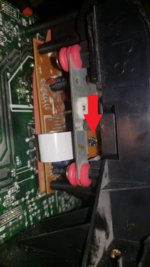
i gave it a shot. unfortunately the laser still shows no activity at all. no movement, no light, absolutely nothing. i slowly turned the power up to max using the method shown in the video. this is assuming i am correct in my assumption that this, pictured here, is the potentiometer.
 

Attachments

  • theshit.png
    theshit.png
    786.1 KB · Views: 3