Hi Everyone,
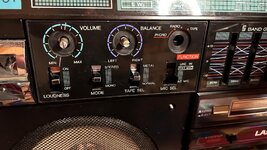
I have the problem that I can’t remove the front panel of a Lasonic TRC-931 Gen 1, the part where the volume pot and the balance control are located.
I want to remove the 931C PCB in order to install an original chrome switch at the Mic Sel. position. However, the potentiometers are fixed to the housing with nuts, and I can’t access them without removing the front cover to remove those nuts.
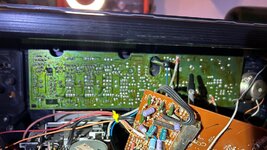
From the inside, I can’t find any screws that would allow the left to be removed. Even the exploded view in the service manual doesn’t help.
The right Panel remooving is easy...there are two srews...but not in the panel left side???
Is it possible that someone modified it and glued the cover on? I can’t really imagine that, though.
Does anyone have an idea?
I have the problem that I can’t remove the front panel of a Lasonic TRC-931 Gen 1, the part where the volume pot and the balance control are located.
I want to remove the 931C PCB in order to install an original chrome switch at the Mic Sel. position. However, the potentiometers are fixed to the housing with nuts, and I can’t access them without removing the front cover to remove those nuts.
From the inside, I can’t find any screws that would allow the left to be removed. Even the exploded view in the service manual doesn’t help.
The right Panel remooving is easy...there are two srews...but not in the panel left side???
Is it possible that someone modified it and glued the cover on? I can’t really imagine that, though.
Does anyone have an idea?