Cap upgrade Conion c100f then not working

caution

Member (SA)
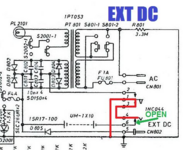
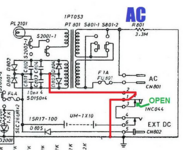
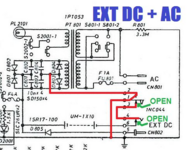
Those are switches inside the power jack that redirect ground depending on if you have AC or DC plugged in.
The upper switch moves when you plug in AC, so it redirects ground from the batteries and DC plug over to the transformer.
The lower switch moves when you insert a DC barrel plug, so it disconnects ground from the batteries.

The AC switch takes precedence over the DC switch, so if you happen to plug both AC and DC in, AC wins.

The AC switch is strictly a switch. The AC plug pushes down on a plastic piece attached to the switch.
The DC switch's moving part (pin 4) has two jobs: it's metallic, and creates the connection to ground against the side of the DC plug.
It also disconnects the ground connection to the batteries.

1781832164899.png1781832218433.png1781832259942.png1781832330885.png
 

keeney123

Member (SA)
Those are switches inside the power jack that redirect ground depending on if you have AC or DC plugged in.
The upper switch moves when you plug in AC, so it redirects ground from the batteries and DC plug over to the transformer.
The lower switch moves when you insert a DC barrel plug, so it disconnects ground from the batteries.

The AC switch takes precedence over the DC switch, so if you happen to plug both AC and DC in, AC wins.

The AC switch is strictly a switch. The AC plug pushes down on a plastic piece attached to the switch.
The DC switch's moving part (pin 4) has two jobs: it's metallic, and creates the connection to ground against the side of the DC plug.
It also disconnects the ground connection to the batteries.

View attachment 62338View attachment 62340View attachment 62341View attachment 62343
Thank you again Caution. I had no idea that the AC plug had a switch in it. I understood the external dc can have a pressure switch. I just did not expect the AC plug having a switch also. It makes sense now. One has to focus on the AC switch or the pin 1 and 2 connections. If it connects and has a resistance in the connection the return line will drop a voltage at that connection.
 

keeney123

Member (SA)
I am a little confused. I know the Transformer board is alright. I touched up the solder joints and now get 20.1Volts out of it. I was confused at first on the power board because someone had made the orange wire going to the ground of the battery holder. I just relabeled it as ground. I also know that when I put negative lead of the meter to where the black wire goes and the red lead of the meter where the red wire goes, I get +20 volts.

Here is the problem. With both switches in the off state, I measure in ohms on the lowest scale 1 ohm or less from the red wire that would connect to the power board to where the cathode or the LEDs on the power/ alarm board. Here is the confusion on the power/alarm board the red wire is connected to the J2003 that is listed as r and the black wire is connected to the B. Looking from the back top side of the power/alarm board where the top of the switches is the red wire is on the right-hand side and the black wire is on the left-hand side. Turning the board over one can see that this connects directly to the cathode of the leds. Am I missing something here or is the board marked wrong or are they running ground at -20 Volts DC?
 

keeney123

Member (SA)
This is what I have physically looking for back solder side of board with power and alarm push buttons at top of page.
 

Attachments

  • power alarm bd.pdf
    740.7 KB · Views: 1

keeney123

Member (SA)
i have also verified that the LEDs are in correctly. This I have done by soldering lead wires to the board on the connections that go to the led and using 2 AA batteries in series and touching the leads to the correct terminals. Negative lead of the battery to the shared cathode of the Leds and then the positive lead of the battery to the line going directly to the anode of one of the Leds. This then lights that led. The red wire soldered to the R connection of J2003 is going to the cathode of the leds.

I also check the blue wire that goes to CN309 the lower board from j2002 of the power/alarm board which also directly connects to the cathode of the Leds . I tried to measure the blue wire pole of CN309 on the lower board to R327 the 220K ohm and did not get a continuity verification on either side of the resistor. That means the cathodes that connecter to this blue wire is not connected to ground to the lower board. Perhaps the black wire of j2002 is the ground. I have not tried that.

I can verify when I got the unit before I change the caps. both the power led and the alarm led lit. I did not do anything with either the wires going from the power board to the power/alarm board. The red line of the power board went to the r of J2003 of the power board.
My conclusion is that my boards and unit do not align with the schematic.
I am going to return the R line to red of the j2003 and the Black line to the B of j2003. This does not make sense to me to do but I do not know the whole layout of the system.

I will also return the Black that goes from the upper cassette to I believe J208 because it was that way before I had to fix a broken board. I actually could not fix the board, so I solder the wires together where they went on the connecting board. Believing that grounds on the schematic whereas shown I solder the black wire to the brown wire. I put everything in Teflon tape. White Teflon tape has an extremely high resistance value better than that of electrical tape. I then rapped the Teflon tape with electrical tape. The tape is then tape to the back of the upper cassette.

All I will need to do is cut the black that goes to J208 and solder a connecting wire and then wrap it around a screw on the upper cassette deck. This is the original design. As the plane of that board was attached with a screw.

After I get everything together, I will power up and let you know if it works.
 
Last edited:

keeney123

Member (SA)
Found the problem.
It has to do with either and error on the schematic or someone put all the diodes in backwards on the power board.

First there is one error on the schematic I have circled it in red. When drawing a negative battery terminal that side is always larger and the positive side is always smaller. That tell the direction the battery is connected. That means when the battery takes over. The connection to the positive voltage side of the battery will now power the units. Not the negative side. The other side of the battery then will be negative. the side that goes to the switched. That side would have a larger slash mark to indicated that. This seems to me to be reverse on the schematic. Also, the external DC has to have a separate ground from its positive lead. The diode in that line prevents a positive voltage from the power supply from taking out the external DC source coming in. As long as the DC source is at or below the supply voltage there will be no current in that line.

On my board the diodes 801 and 802 are connected at their anode terminals. Just the opposite of the schematic drawing. The diode 803 and 804 are both connected at their cathode side.again just the opposite of the schematic drawing. This still makes a full bridge rectified however the switches inside the external Dc and the inside the AC plug switch now changes from a ground switching to a positive DC switch. To me this is what I would expect. Instead of switching grounds the voltage gets switch.

But like anything one cannot depend on experience.

All my power board diodes in the bridge circuit have their cathodes facing towards the outer edge of the board.

I would ask caution if he has a picture of his diodes on the power board if he would share it. I think earlier he did I will have to look back?
That all I have now. I will have to analyze more to get a better understanding. One does not expect a unit out in field to have backward diodes.
 

caution

Member (SA)
This is what I have physically looking for back solder side of board with power and alarm push buttons at top of page.

I traced the same board and see some issues. Since the power and alarm buttons each have two rows of six pins, I assume that they're 4-gang SPDT switches. Each row should have two switches, with each common pin the second pin in from each end of the row of pins (the second and fifth pin).

If correct, the PCB does not match the schematic. One of the rows of pins for the alarm button has nothing connected to the last two pins, which would mean nothing is connected to one of the common pins of a switch, even though all four switch sections for the security button are on the schematic: S2002-1, S2002-2, S2002-3 and S2002-4.

Also, I see PCB connections to all four switches for the power button, but only see switches 1 and 2 on the schematic. S2001-3 and S2001-4 are missing. It's possible the engineers connected to some pins as a way to get a PCB trace past a pin blocking its destination, and knew that connecting to the other pin didn't affect the circuit. I've seen that before in old audio gear. So even though these switch sections have connections to some of their pins, they don't actually do anything useful and were left off of the schematic.

Since I have photos of the transformer board, I know where the wires going to the power switch board are supposed to go, and not only are the names for the two switches for the power light backwards (S2001-1 and S2002-1) but there is no consistency to the layout of the four switches in each button. The section-1 switch for each button seems to be in the far outer corners for each switch, putting them on opposite rows from one another. The pin ordering is also inconsistent, because if the common pin of one of them ties to a throw pin on the other, then why does the board have a trace connecting the second-to-last (common) pin together across switches in each button?

Anyway, I don't have pics of where all the other wires go on the amp and tape deck boards, so I can't figure out how the four switches in each button are arranged, if their ordering is different between the two buttons, and if my assumption about the ordering of common and throw pins is right.

Oh by the way, in those diagrams I posted of the batteries/AC/DC configurations, I noticed a mistake. The schematic we all have for this unit came from the back of a Clairtone 7980 user manual. That version has reversed polarity on the DC jack from the Conion version. The C-100F has ground on the center pin and power on the outside, and the 7980 has power on the center pin and ground on the outside. But when you look at the schematic, the center pin (CN802 pin 5) has a little vertical line connecting it down to the ground line running under it. Clairtone didn't finish modifying the Conion schematic when redrawing it for the reversed polarity. That connection should not be there. The only thing the center pin should connect to is D805.

 
  • Like
Reactions: keeney123

keeney123

Member (SA)
I have concluded that my set up is correct. How I determined this is by the center pin of the external DC. That is the positive voltage pin. It is directly in the back of the connector. This pin goes directly the positive side of the CN804. The ground of the DC external connector go just to the white side of CN802. It can be determined to be ground because it is on the side of the external DC connector in the back. The outside round part of a external DC plug is always Ground. That way the center portions the positive side is always protected from accidental discharge. The White side is the negative side for the battery. My wires going to the battery compartment are orange and white. So, I assume someone change them. When they connected to the battery housing they switch where they went. It is obvious that the white wire should go to the spring side of the battery which is negative and the orange or if it was yellow at some time should go the tab side of the battery because it is positive and connects to the red side of the CN804.

Such Boomboxes could have different configuration for the same model. So, one has to proceed with "caution" when analyzing if their unit is correct.
 

caution

Member (SA)
When drawing a negative battery terminal that side is always larger and the positive side is always smaller.
You have it backwards. A negative battery terminal is smaller and the positive side is always larger when drawing a schematic symbol. Do a Google image search for battery schematic symbol and you will see it.
 

keeney123

Member (SA)
I traced the same board and see some issues. Since the power and alarm buttons each have two rows of six pins, I assume that they're 4-gang SPDT switches. Each row should have two switches, with each common pin the second pin in from each end of the row of pins (the second and fifth pin).

If correct, the PCB does not match the schematic. One of the rows of pins for the alarm button has nothing connected to the last two pins, which would mean nothing is connected to one of the common pins of a switch, even though all four switch sections for the security button are on the schematic: S2002-1, S2002-2, S2002-3 and S2002-4.

Also, I see PCB connections to all four switches for the power button, but only see switches 1 and 2 on the schematic. S2001-3 and S2001-4 are missing. It's possible the engineers connected to some pins as a way to get a PCB trace past a pin blocking its destination, and knew that connecting to the other pin didn't affect the circuit. I've seen that before in old audio gear. So even though these switch sections have connections to some of their pins, they don't actually do anything useful and were left off of the schematic.

Since I have photos of the transformer board, I know where the wires going to the power switch board are supposed to go, and not only are the names for the two switches for the power light backwards (S2001-1 and S2002-1) but there is no consistency to the layout of the four switches in each button. The section-1 switch for each button seems to be in the far outer corners for each switch, putting them on opposite rows from one another. The pin ordering is also inconsistent, because if the common pin of one of them ties to a throw pin on the other, then why does the board have a trace connecting the second-to-last (common) pin together across switches in each button?

Anyway, I don't have pics of where all the other wires go on the amp and tape deck boards, so I can't figure out how the four switches in each button are arranged, if their ordering is different between the two buttons, and if my assumption about the ordering of common and throw pins is right.

Oh by the way, in those diagrams I posted of the batteries/AC/DC configurations, I noticed a mistake. The schematic we all have for this unit came from the back of a Clairtone 7980 user manual. That version has reversed polarity on the DC jack from the Conion version. The C-100F has ground on the center pin and power on the outside, and the 7980 has power on the center pin and ground on the outside. But when you look at the schematic, the center pin (CN802 pin 5) has a little vertical line connecting it down to the ground line running under it. Clairtone didn't finish modifying the Conion schematic when redrawing it for the reversed polarity. That connection should not be there. The only thing the center pin should connect to is D805.
I think the D805 must be inside the housing I see nothing no D805 outside the housing. It may be hard to tell without an actually plug insert in the External Dc.
 

keeney123

Member (SA)
You have it backwards. A negative battery terminal is smaller and the positive side is always larger when drawing a schematic symbol. Do a Google image search for battery schematic symbol and you will see it.
I am sure of this. I have done enough electronics to know. If someone has change that they have made a very bad mistake. it imitates the physical coil of a battery holder. The small tab indicated the positive of a battery holder.

Also, in electronics class and electrical class the negative battery side is always bigger. One learns this when doing superposition of batteries.

It also reminds a person that the larger part of the connector is negative. One can have many different voltages and current going out with only one return. The return line then has to handle all that current therefore it is bigger in physical size.
 
Last edited: